Your Personal Swim Coach, Powered by Your Apple Watch
Earn your analytics. One lap at a time.
Smart workout suggestions based on your goals, your history, and how you feel today. Download free with sample data. Connect your real swims for $4.99, once.
Today's Session
1,400m Ready
Achievement
New PR!
Not Just Another Tracking App
Most swim apps give you data. Lapwizard gives you direction.
Data overload without direction
Progressive complexity
Most apps drown you in metrics from day one. Lapwizard shows you only what matters, until you're ready for more.
Pay-to-win feature gates
Try everything free
Most apps hide features behind subscriptions. Lapwizard lets you explore the full experience with sample data before you spend a cent. When you're ready, $4.99 connects your real swims. That's it.
Tracking without direction
Smart session suggestions
You don't need more data. You need a plan. Lapwizard tells you what to swim next based on your goals and how you feel.
How Lapwizard Works
Three simple steps to smarter swimming
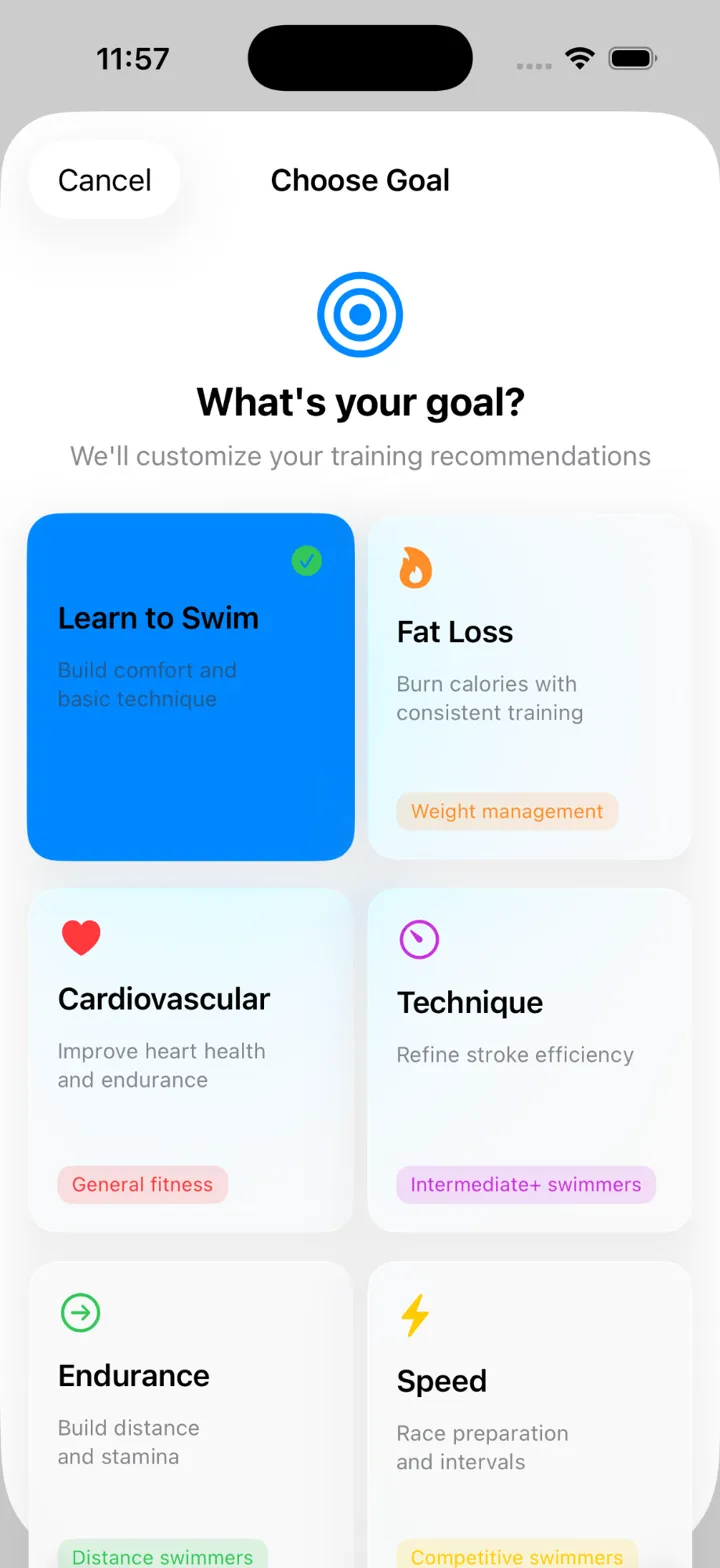
Set Your Goal
Choose from 6 training goals: Learn to Swim, Fat Loss, Cardio Health, Technique, Endurance, or Speed. Each shapes your personalized workout plan.
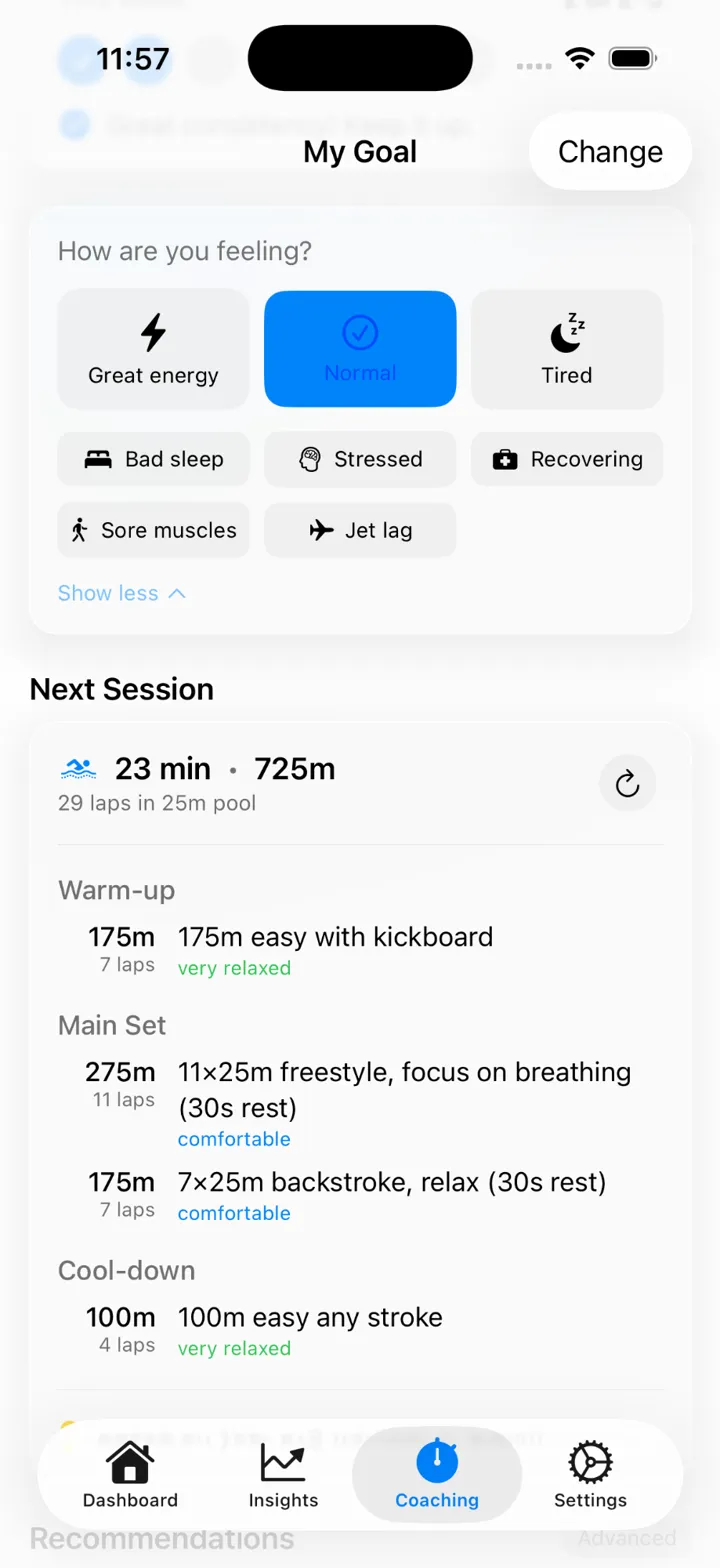
Tell Us How You Feel
Select from 8 readiness levels, from 'Great energy' to 'Recovering from illness'. Your session adjusts automatically to match your body today.
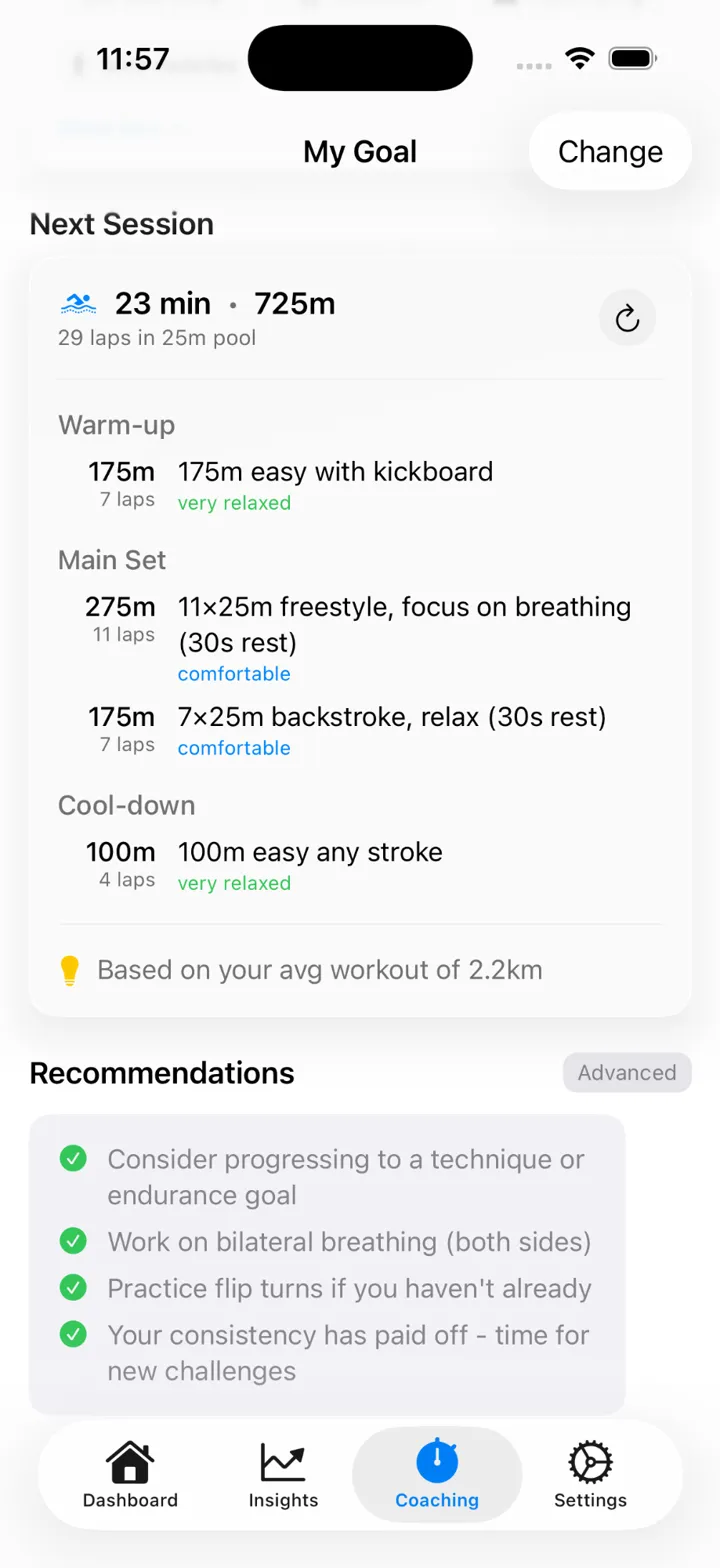
Get Your Session
Receive a complete workout with warm-up, main sets, and cool-down. Everything personalized to your goal, fitness level, and recent history.
Everything You Need to Swim Smarter
Coaching features that adapt to your journey, from first lap to personal best
Smart Session Generator
Get personalized workouts based on your goal, readiness, and recent swimming history. Not generic plans. Sessions built for you.
6 Training Goals
Learn to Swim, Fat Loss, Cardio Health, Technique, Endurance, or Speed. Each goal optimizes your workouts for specific outcomes.
8 Readiness Levels
From 'Great energy' to 'Recovering from illness'. Your session volume and intensity adjust to how your body feels today.
Progressive Tiers
Features unlock at 15 and 40 workouts. No overwhelming dashboards on day one, just what you need, when you're ready.
CSS & Training Zones
Calculate your Critical Swim Speed and get 5 personalized training zones. The same methodology used by Olympic coaches.
Apple Health Sync
Automatically imports your swim workouts from Apple Watch. No manual entry, no accounts, no cloud uploads. Your data stays yours.
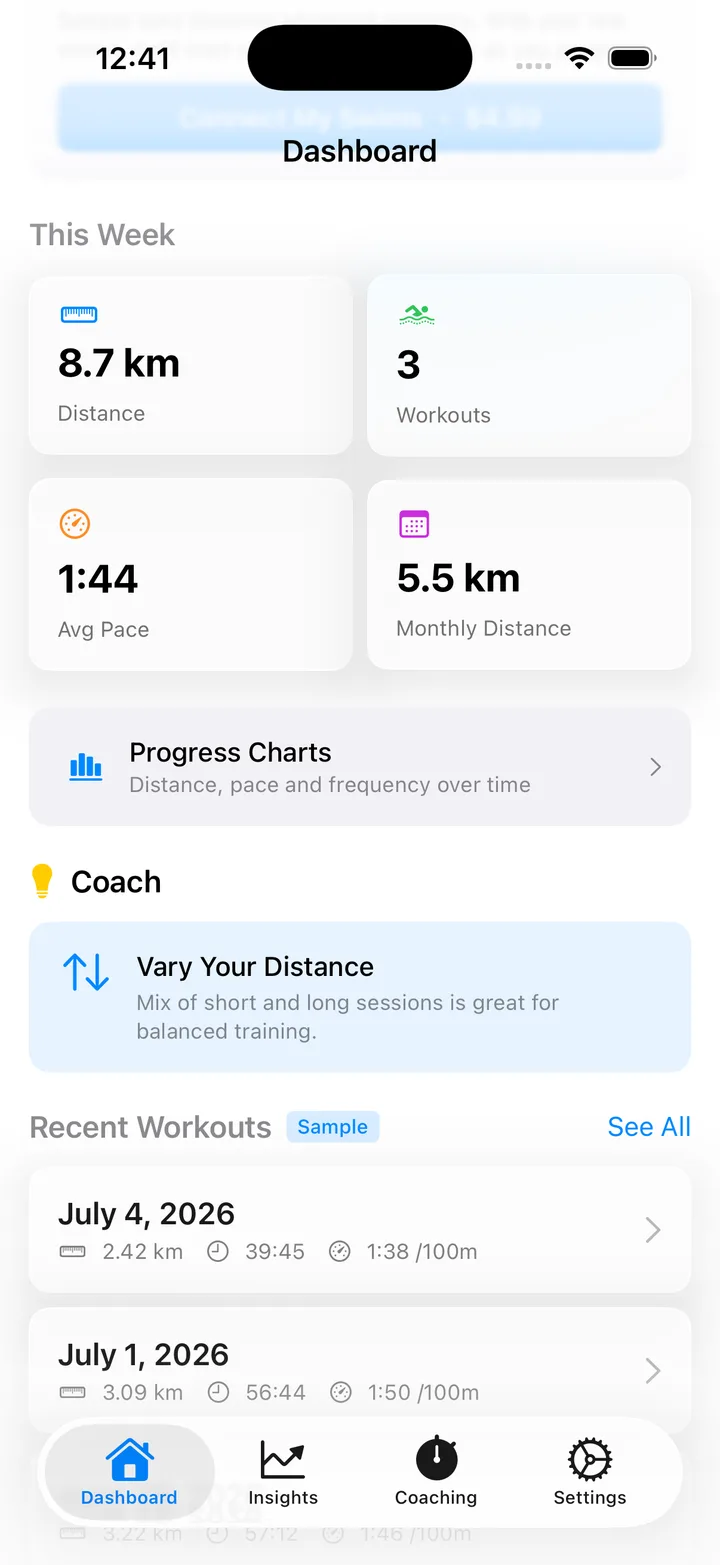
Your daily home base
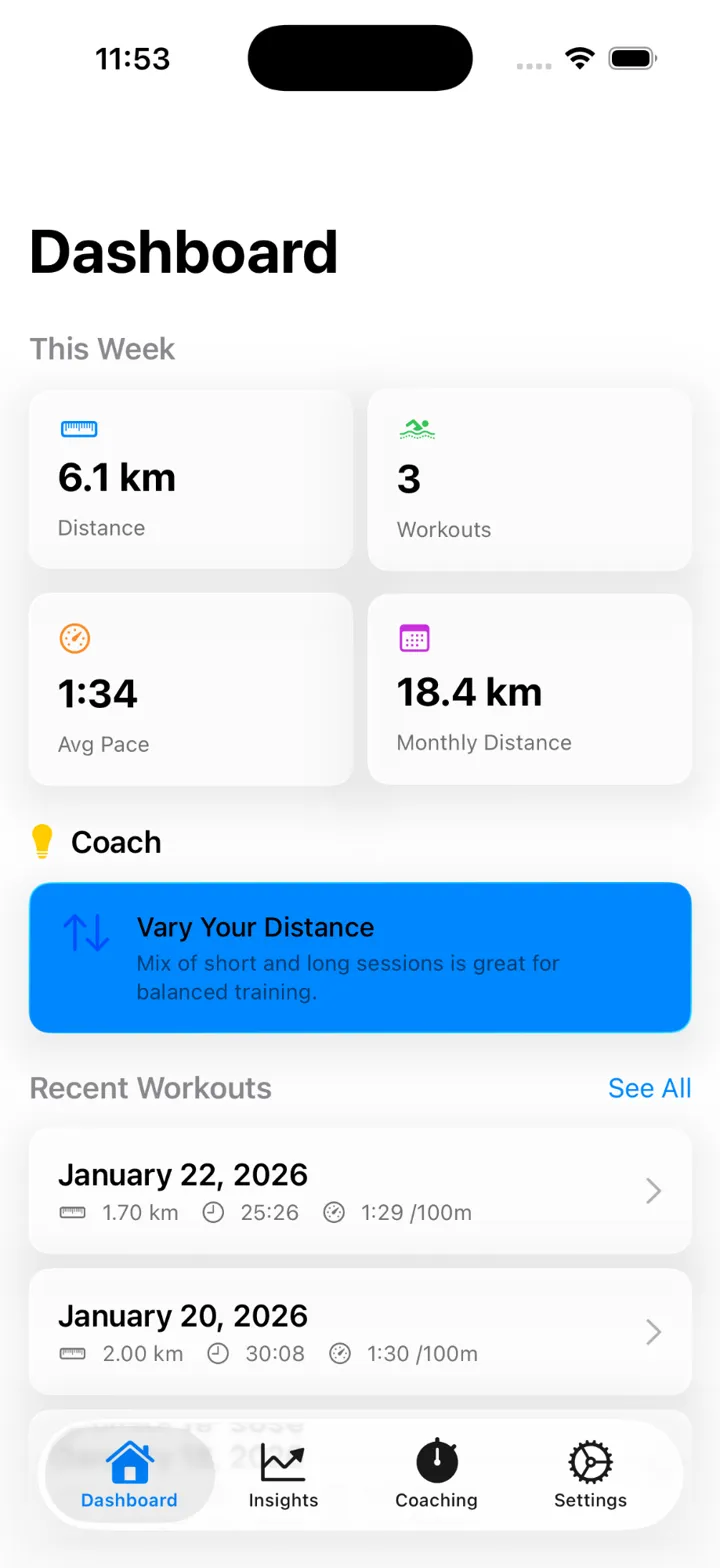
Open the app and know exactly where you stand, in about five seconds. The Dashboard tab greets you with this week's numbers, one coaching tip worth acting on, and your most recent swims, no digging required.
Weekly Distance
Workout Count
Average Pace
Monthly Distance
This Week tiles keep distance, workout count, average pace, and monthly totals in one glance.
One prioritized coaching tip, picked for what matters most in your training right now.
Recent Workouts, always one tap away from a full breakdown.
See everything you have earned
This is what "earn your analytics" actually unlocks: Training Load, Efficiency, Performance, and Personal Records, all in one hub that grows richer the more you swim.
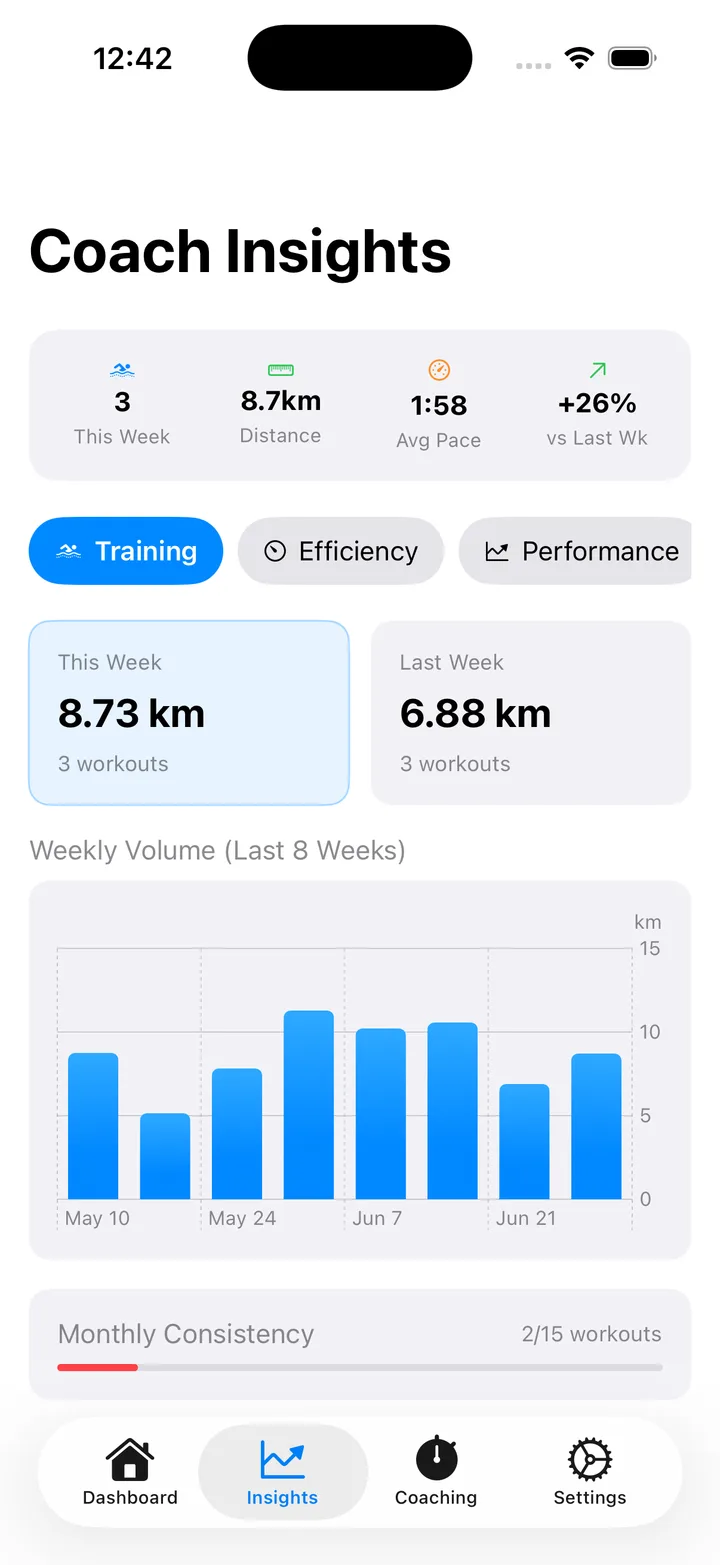
Training Load
8 weeks of volume in one chart, plus a consistency indicator that shows whether you are actually building a habit.
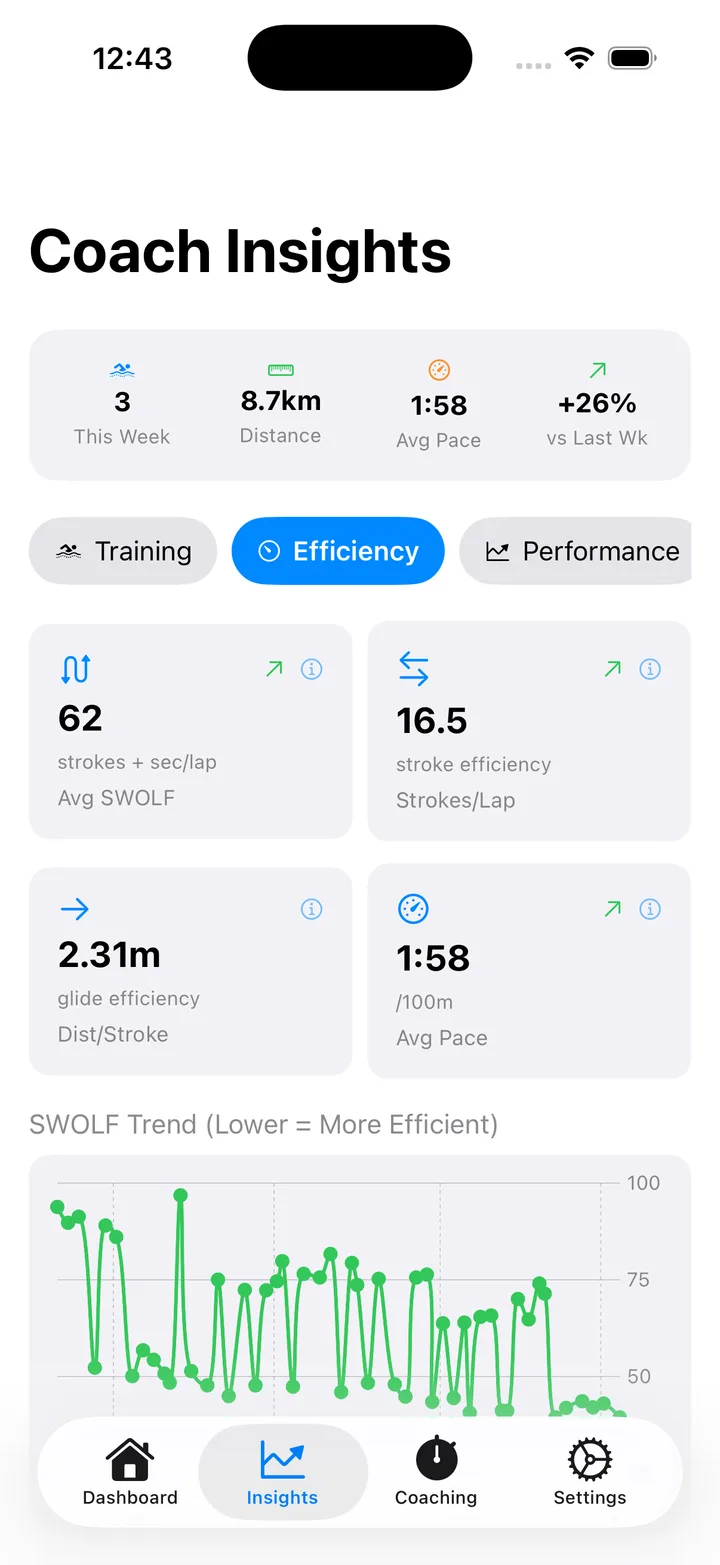
Efficiency
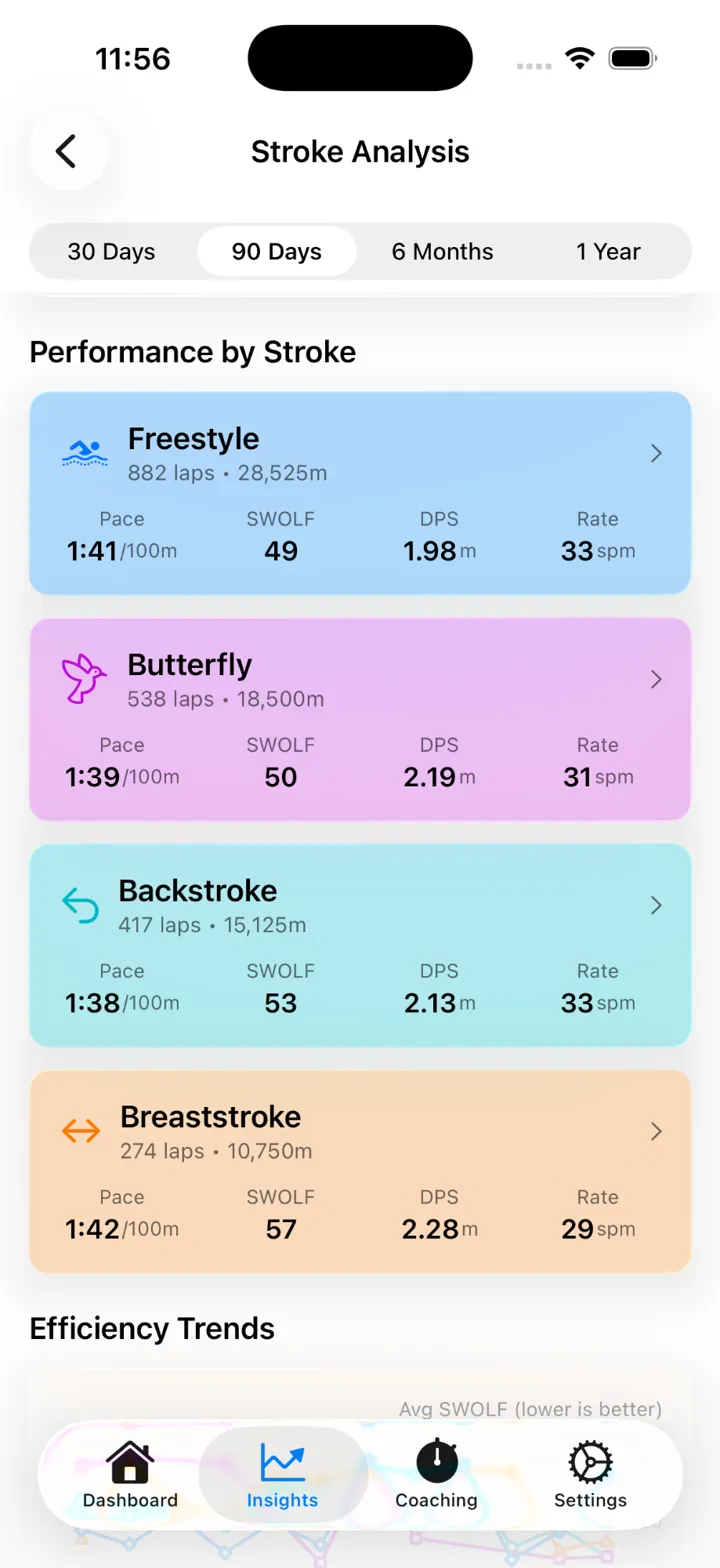
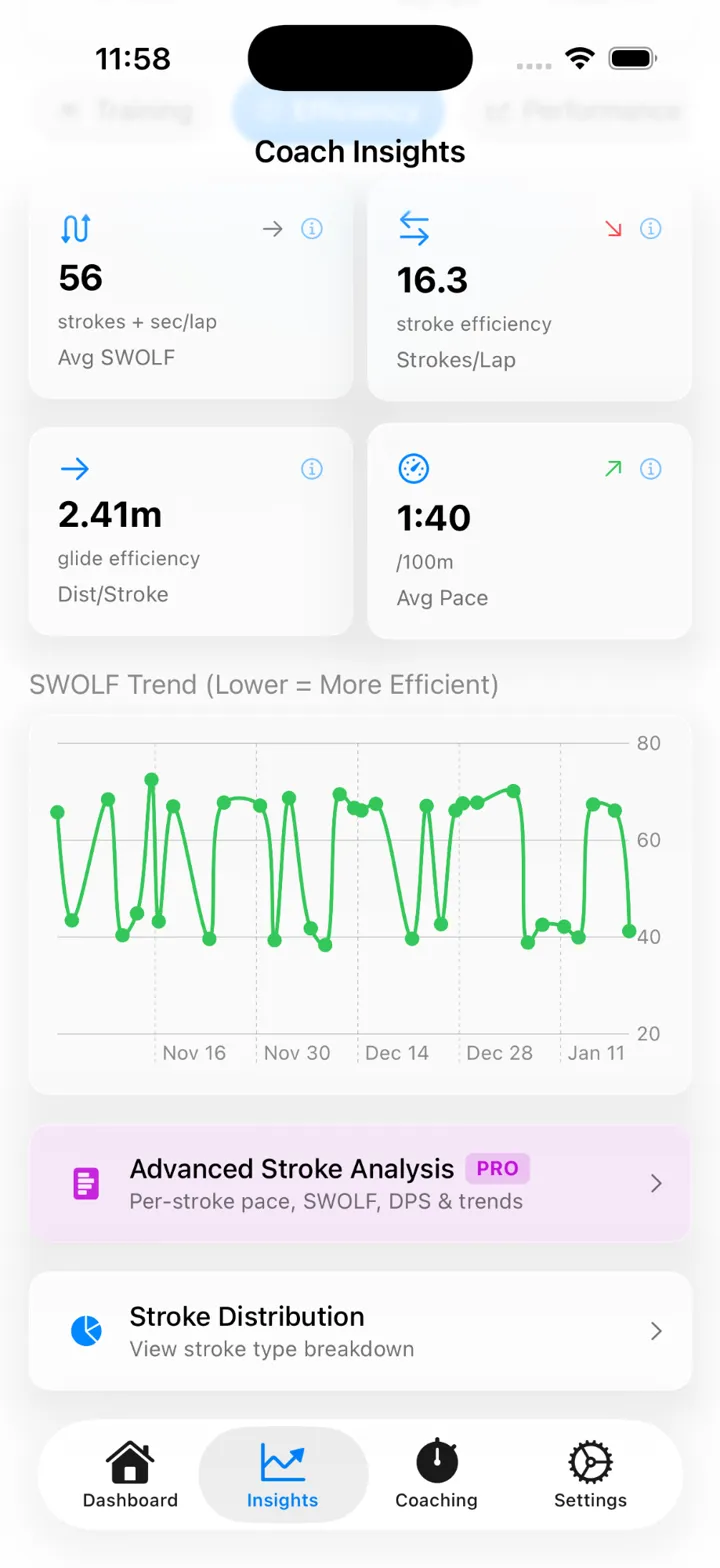
IntermediateSWOLF trend, strokes per lap, and distance per stroke, tracked over time so technique gains show up as clearly as fitness gains.
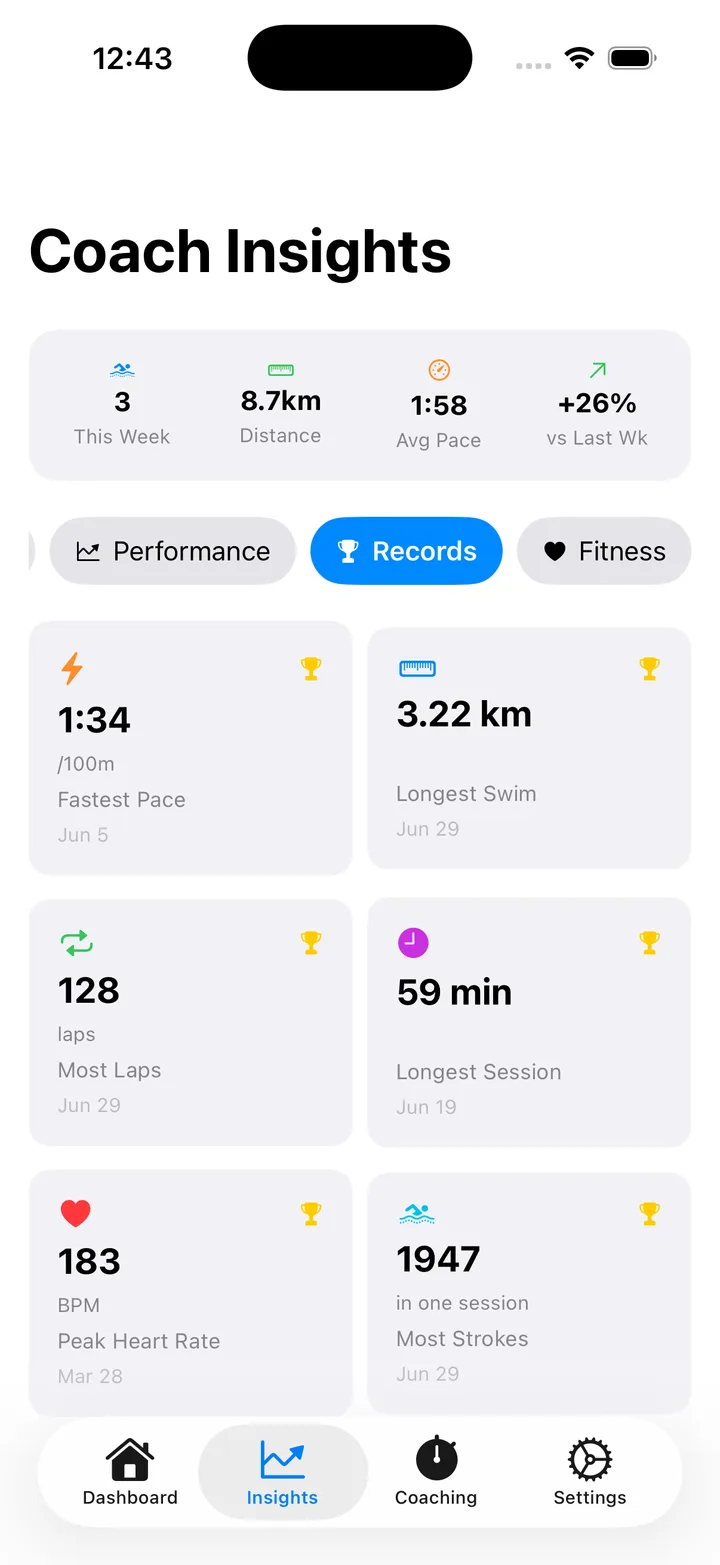
Personal Records
Six records worth chasing: fastest 100m pace, longest single swim, most laps in a session, longest session by time, peak heart rate, and most strokes.
Performance
Pace improvement charted over the last four weeks, so progress is a fact, not a feeling.
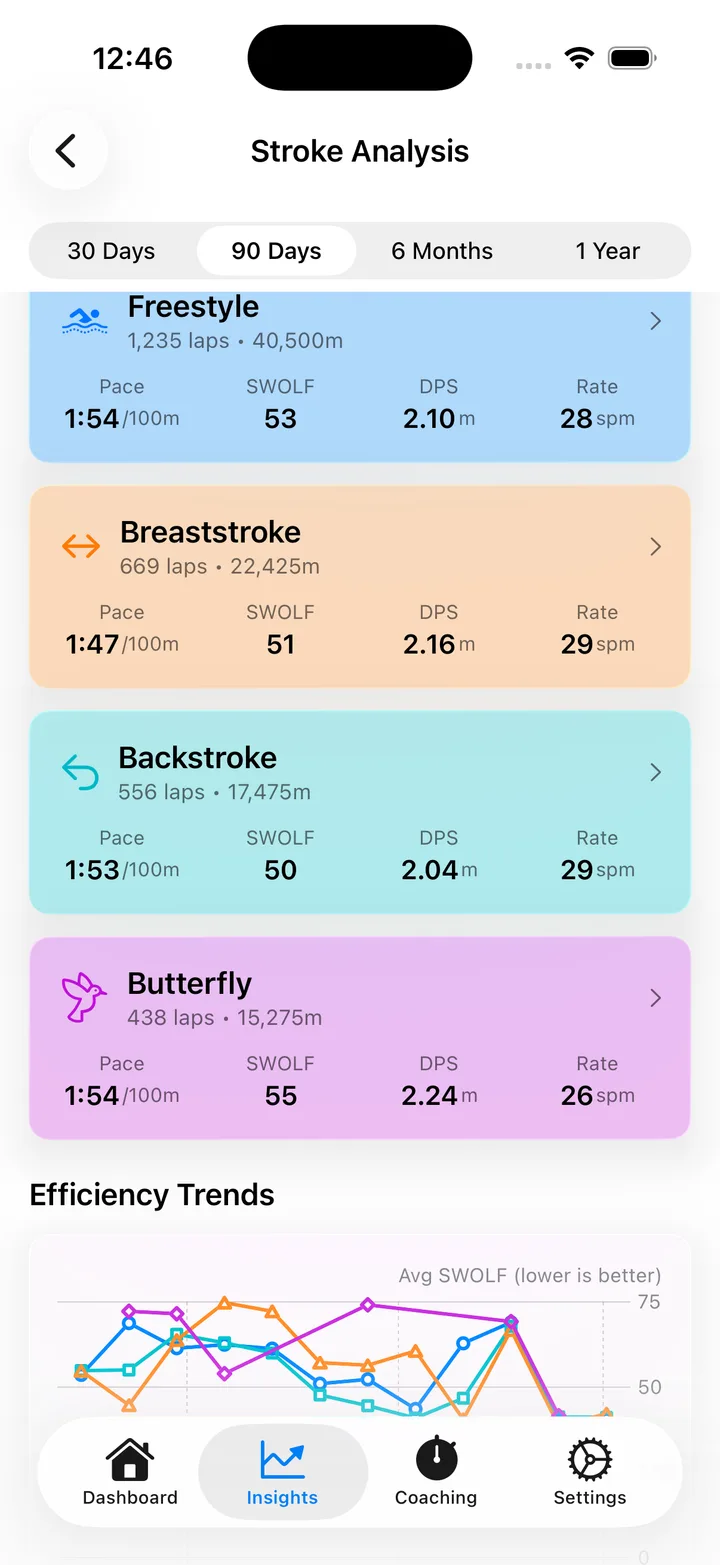
Stroke Analysis
IntermediateA per-stroke time breakdown, weekly trends, and a tip tailored to each stroke you swim.
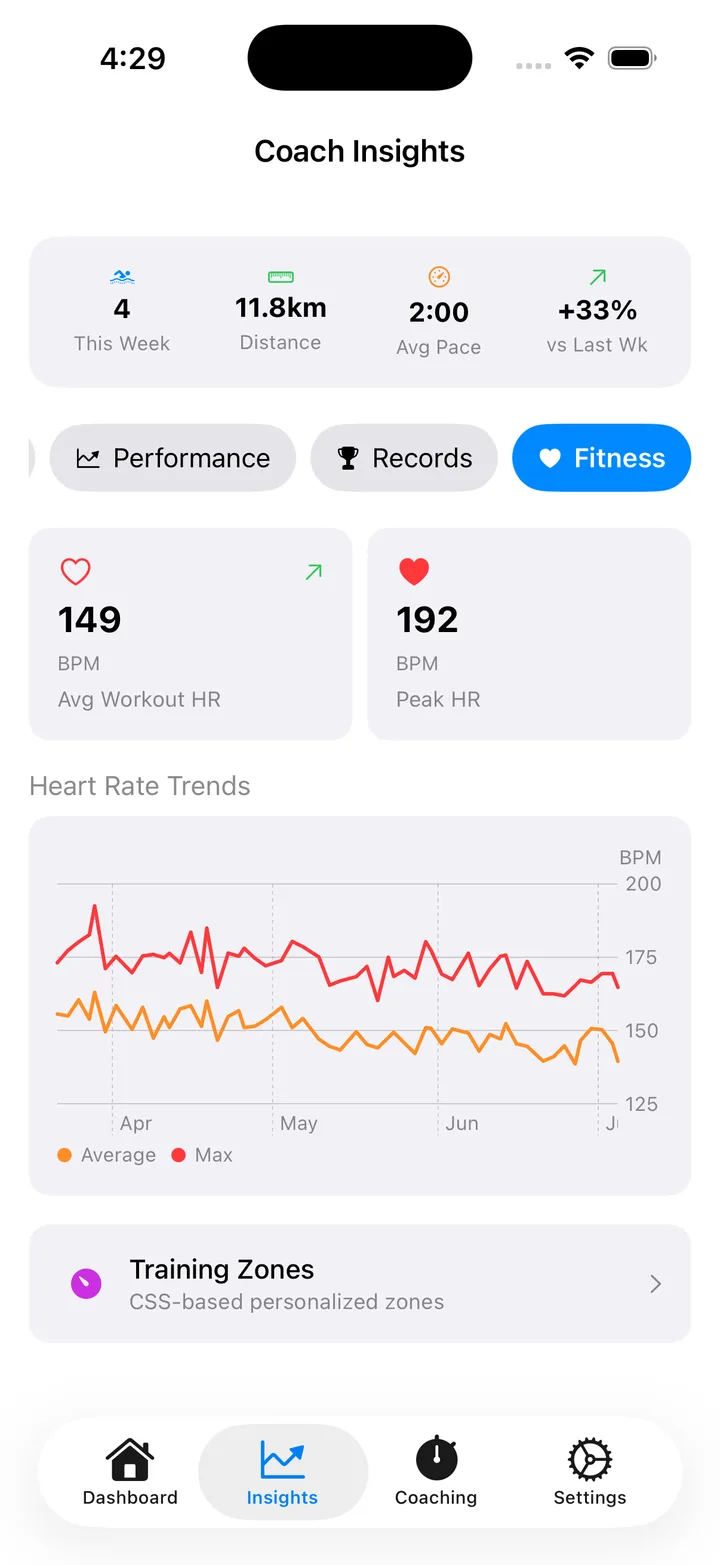
Fitness Indicators
AdvancedAverage and peak heart rate trends, so effort is part of the picture, not just distance.
Every swim, fully broken down
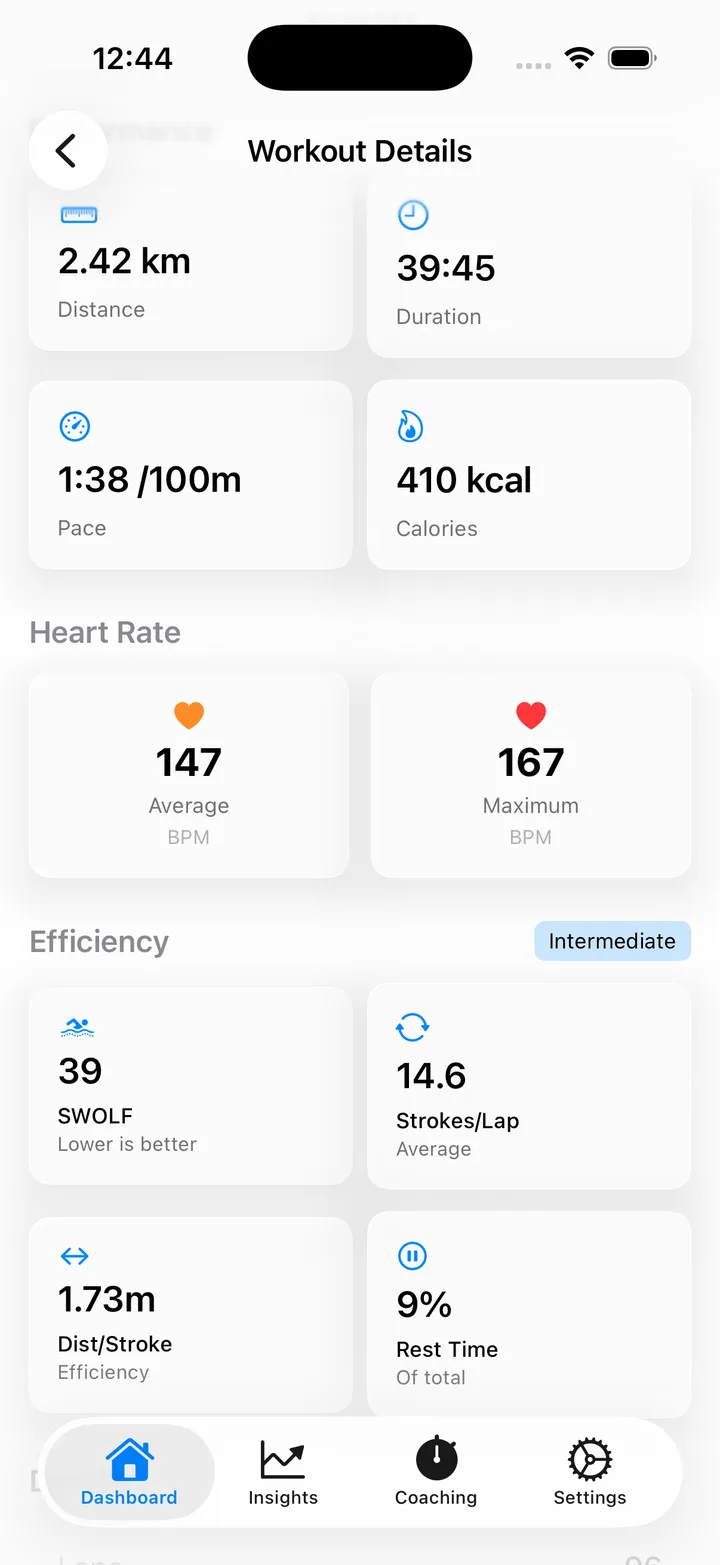
Tap any workout and get the full picture: distance, duration, pace, calories, heart rate, and efficiency metrics, all in one place.
The full stat line, distance, duration, pace, calories, heart rate, and efficiency, without switching screens.
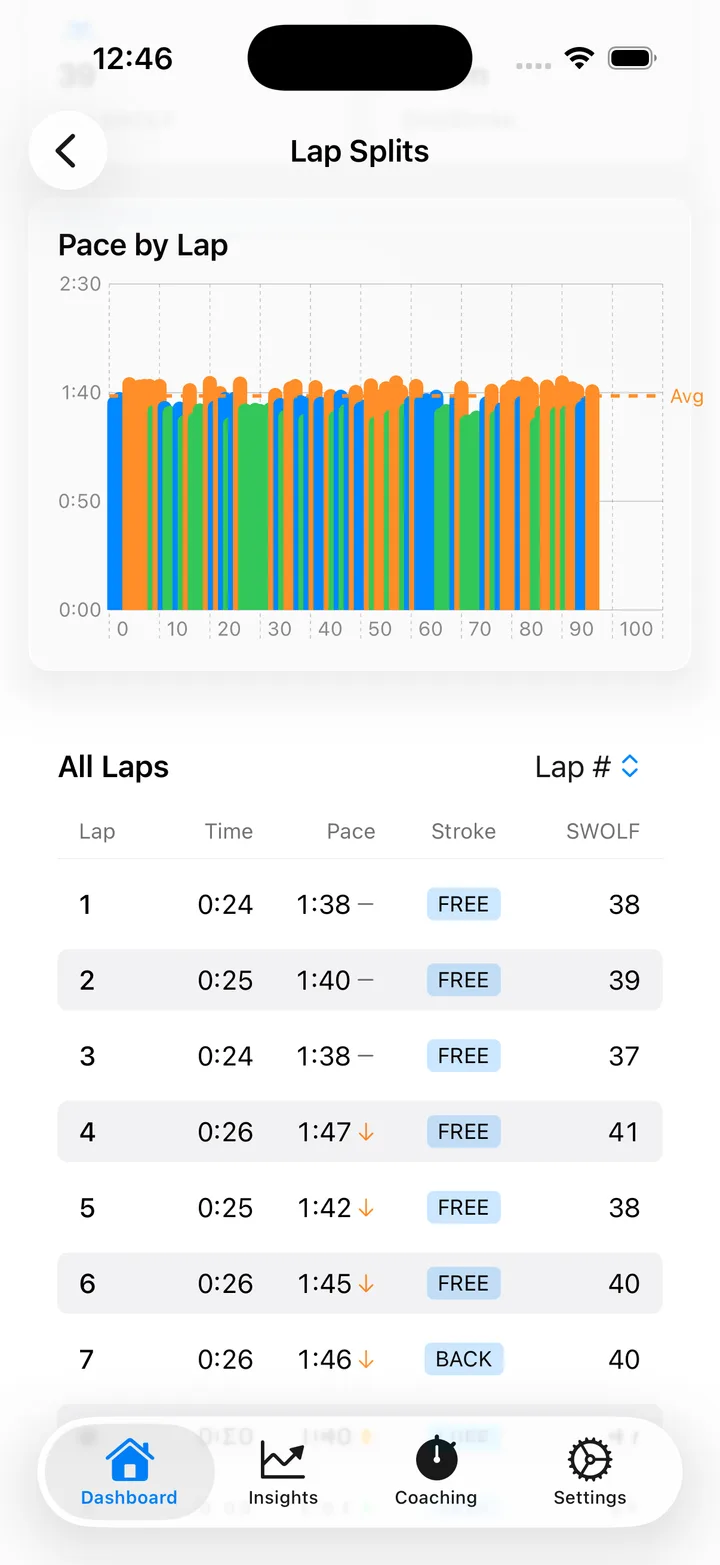
A per-lap splits chart that shows, at a glance, whether you went out too fast or held a steady pace all the way through.
Your Features Grow With You
By default, analytics unlock progressively as you swim more. Experienced swimmers can override and access everything immediately.
Beginner
Day 1
- Distance & duration tracking
- Weekly volume charts
- Personal records
- Basic pace display
- Coaching tips
Intermediate
15 Workouts
- Everything in Beginner, plus:
- SWOLF efficiency scores
- Strokes per lap
- Distance per stroke
- Stroke type breakdown
- Lap splits analysis
Advanced
40 Workouts
- Everything in Intermediate, plus:
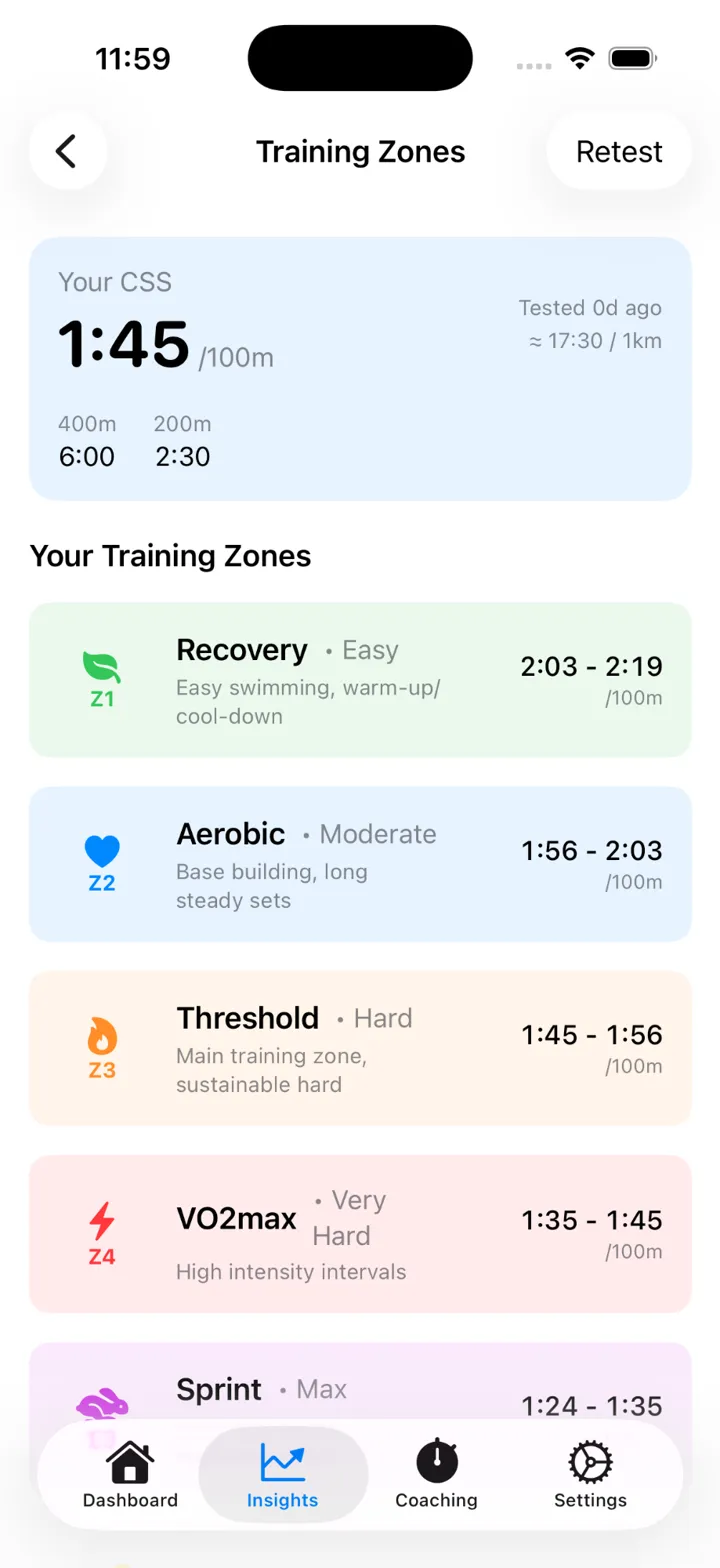
- CSS calculator
- 5 personalized training zones
- Per-stroke performance metrics
- Advanced training recommendations
- Structured workout planning
Tiers unlock automatically as you swim. Want everything now? You can override in Settings.
Leveling up feels like something
Cross 15 workouts and a celebration screen greets you, along with a new set of tools to make sense of your swimming. Cross 40 and it happens again. Nothing is handed to you on day one. It is earned, one lap at a time.
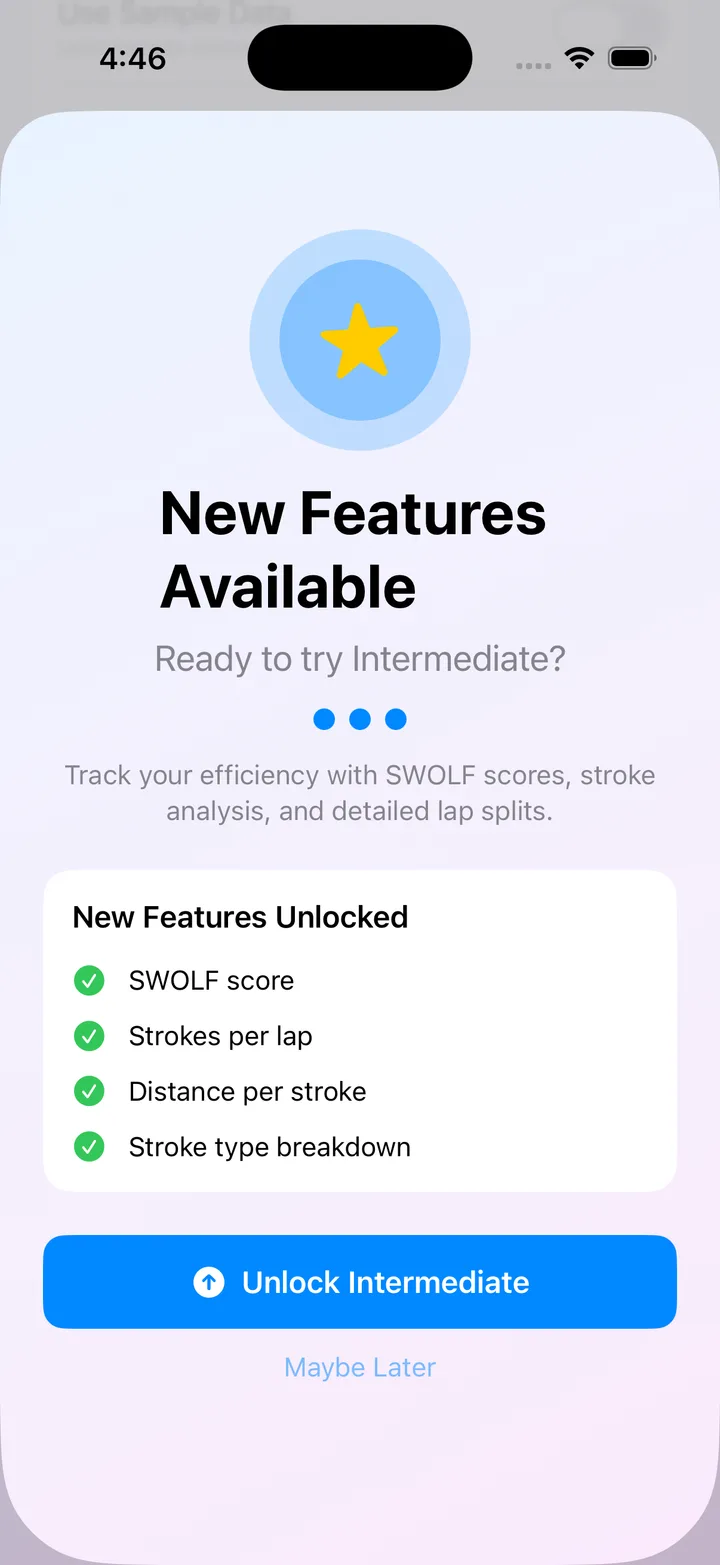
Earn your analytics, one lap at a time.
We're Different. On Purpose.
See how Lapwizard compares to typical swim apps
"Finally, an app that respects my journey."
Already a Competitive Swimmer?
Skip ahead. We get it.
If you already swim regularly, you don't need to wait 40 sessions to see your SWOLF. Override the tier system in Settings and access every metric from day one.
The progressive system is there for swimmers who prefer to ease in, not to gatekeep experienced athletes.
Your experience. Your choice. No waiting required.
Progressive Mode
Unlock features as you swim
Great for building habits
Override Mode
Access everything immediately
Perfect for experienced swimmers
Critical Swim Speed & Training Zones
CSS is the fastest pace you can sustain aerobically: your threshold. It's calculated from your 400m and 200m time trials, using the same methodology trusted by Olympic coaches.
Personalized zones: not generic pace ranges, but zones calculated from YOUR performance
Guided time trials: we walk you through the CSS test protocol step by step
Zone-based sessions: workouts that target specific energy systems for optimal training
Unlocks after 40 workouts in the Advanced tier
We teach you the language
Swim science comes with jargon. Every time Lapwizard introduces a new term, it defines it, works through an example, and gives you a tip to act on, right where you need it.
SWOLF
Your swim golf score: strokes per lap plus seconds per lap. Lower means more efficient.
Example: 18 strokes plus 22 seconds gives a SWOLF of 40.
Tip: watch SWOLF trend down over weeks to see technique improve, not just fitness.
CSS
Critical Swim Speed, the fastest pace you can hold aerobically, calculated from two time trials.
Example: a 400m and a 200m time trial might put your CSS at 1:38 per 100m.
Tip: use CSS to set real training zones instead of guessing at pace.
Negative Splits
Swimming the second half of a set faster than the first half.
Example: 3:10 for the first 200m, 3:05 for the second 200m.
Tip: negative splits usually mean better pacing discipline, not just more fitness.
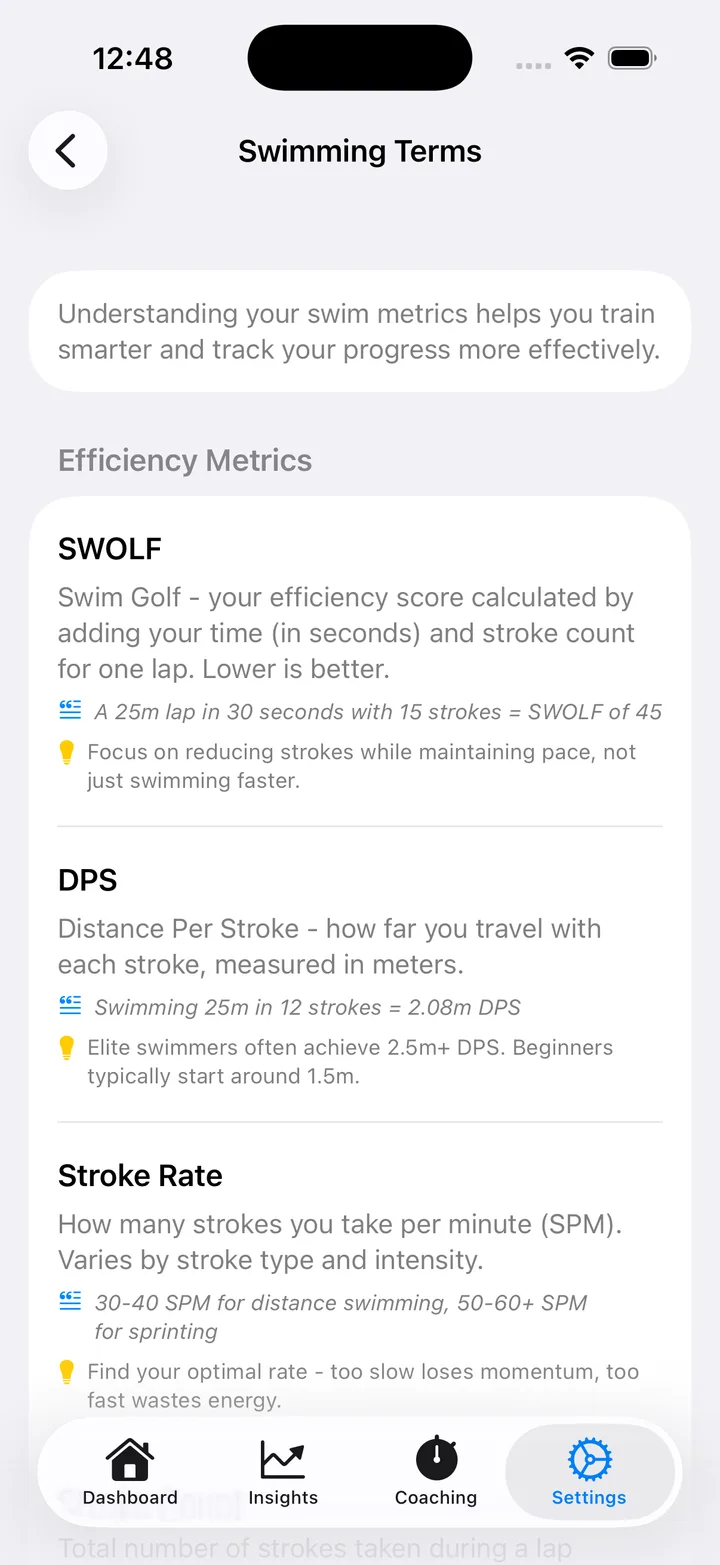
New terms get their own quick tutorial the moment a tier unlocks them.
Your Data Stays on Your Device
We believe your swimming data is personal. That's why it never leaves your phone.
On-Device Only
All your swim data stays on your iPhone, encrypted and protected while your phone is locked. We never upload it anywhere.
No Accounts
No email, no password, no sign-up. Just download and swim.
Read-Only Access
We only read from Apple Health. We never write or modify your data.
No Third Parties
No analytics, no tracking, no ads. Your data isn't our product.
We only read swimming workouts, heart rate, active calories, swimming distance, and stroke count from Apple Health.
You can revoke Health access anytime in iOS Settings. We'll respect that instantly.
Simple, Honest Pricing
No subscriptions. No recurring charges. One price, forever.
- Free to download and explore with sample data
- $4.99 unlocks your real Apple Watch swim data
- All features included, forever
- No subscription, no recurring charges
- All future updates included
Try the full app with 50+ sample workouts spanning four months before you buy.
A personal swim coach costs $50-100 per session.
Lapwizard gives you personalized coaching for a one-time cost of $4.99.
Frequently Asked Questions
Everything you need to know about Lapwizard
What makes Lapwizard different from other swim apps?
Most swim apps overwhelm you with data from day one and lock features behind monthly subscriptions. Lapwizard is different: you can explore the full app free with sample data, features unlock progressively as you swim (or immediately if you override), and it costs $4.99 once instead of a monthly subscription.
Is there a free trial?
Lapwizard is free to download. The app ships with 50+ realistic sample workouts spanning four months of simulated improvement, so you can explore every feature, every screen, and every analytics view before spending anything. When you're ready to connect your own Apple Watch swim data, it's a one-time $4.99 purchase. No subscription, no recurring charges.
What do I get for free vs. the $4.99 purchase?
The free download gives you the complete app experience with sample swim data. You can explore every feature: workouts, analytics, training zones, coaching suggestions. The $4.99 one-time purchase connects the app to your real Apple Watch swim data via Apple Health. There's no feature difference between free and paid, only whether you're looking at sample data or your own.
Why is it a one-time purchase instead of a subscription?
Lapwizard has no backend servers, no cloud storage, and no ongoing costs. Charging a monthly subscription for an app that runs entirely on your device didn't feel right. $4.99 once gives you everything, forever, including all future updates. If you get a new phone or reinstall the app, you can restore your purchase for free through the App Store, no need to pay again.
How do I unlock Intermediate and Advanced features?
By default, features unlock based on your workout count: Intermediate at 15 workouts, Advanced at 40 workouts. But if you're an experienced swimmer who wants everything immediately, you can override the tier system in Settings. The progressive system is there for swimmers who prefer to ease in, not to hold anyone back.
Can I override the progressive tier system?
Yes. Go to Settings and unlock Intermediate or Advanced tiers manually. The default progression exists for swimmers who prefer to build up gradually, but experienced swimmers can access all analytics from their first workout.
Will connecting my Apple Health history instantly unlock Intermediate or Advanced?
No. Tier progress counts only new workouts recorded after you connect your real data, so importing years of existing Apple Health history won't instantly jump you to Advanced. If you'd rather skip the progression and see everything right away, you can override the tier system in Settings.
What is Critical Swim Speed (CSS)?
CSS is the fastest pace you can sustain aerobically, essentially your threshold pace. It's calculated from 400m and 200m time trials using a formula trusted by Olympic coaches. Lapwizard guides you through the test and uses your CSS to create 5 personalized training zones for optimal training.
Does Lapwizard work with Apple Watch?
Yes! Lapwizard reads your swim workouts directly from Apple Health, which syncs automatically from your Apple Watch. You swim with your watch as normal, and Lapwizard imports and analyzes your data. No manual entry required.
Where is my data stored?
All your data stays on your device. We don't have accounts, cloud storage, or servers that store your swim data. Lapwizard reads from Apple Health using read-only access. Your swimming history never leaves your iPhone.
Can I use Lapwizard as a complete beginner?
Lapwizard includes a 'Learn to Swim' training goal designed specifically for beginners. The app starts simple with just the basics: distance, duration, and encouraging tips. As you swim more, the complexity grows with you. You'll never feel overwhelmed.
What are the 6 training goals?
Lapwizard offers six training goals: Learn to Swim (for beginners), Fat Loss (steady calorie burn), Cardio Health (heart health focus), Technique (efficiency and form), Endurance (distance and stamina), and Speed (race pace and intervals). Each goal shapes your workout suggestions.
How does the readiness system work?
Before each session suggestion, you select how you're feeling from 8 readiness levels: Great energy, Normal, Tired, Bad sleep, Stressed, Recovering from illness, Sore muscles, or Jet lag. Your workout volume and intensity automatically adjust to match your body today.
Have more questions? Contact support
Swimmers Love Lapwizard
Join thousands of swimmers who've found their coach
"Finally an app that doesn't overwhelm me with data I don't understand. The progressive unlock system is brilliant."
Mike R.
Fitness Swimmer
"The session suggestions are spot-on. It's like having a coach in my pocket who actually knows how I'm feeling today."
Jennifer T.
Triathlete
"I love that I had to earn the advanced features. Made hitting 40 workouts actually feel like an achievement."
David K.
Masters Swimmer
"The CSS calculator and training zones changed how I train. Finally understand what pace I should be hitting."
Sarah M.
Competitive Amateur

Ready to Start Swimming Smarter?
Download free. Explore with sample data. Connect your swims when you're ready.
Earn your coaching. One lap at a time.